// Main landing page composition.

const { useTweaks, TweaksPanel, TweakSection, TweakRadio, TweakColor, TweakToggle } = window;

const DEFAULT_TWEAKS = /*EDITMODE-BEGIN*/{
  "accent": "#f5a623",
  "headlineStyle": "mono",
  "showStream": true,
  "density": "comfortable"
}/*EDITMODE-END*/;

const HEADLINE_OPTIONS = [
  { value: 'mono', label: 'Mono' },
  { value: 'mixed', label: 'Mono + Sans' },
];
const DENSITY_OPTIONS = [
  { value: 'comfortable', label: 'Comfortable' },
  { value: 'compact', label: 'Compact' },
];

function Logo({ size = 15 }) {
  return (
    <a href="#" className="logo" style={{ fontSize: size }}>
      <span className="status-dot"></span>
      ADAPTIER
      <span className="ver">v0.42.1</span>
    </a>
  );
}

function Nav() {
  return (
    <nav className="top">
      <div className="container">
        <Logo />
        <div className="nav-links">
          <a href="#">Product</a>
          <a href="#">Protocols</a>
          <a href="#">PLC</a>
          <a href="#">Deploy</a>
          <a href="#">Docs</a>
          <a href="#">Pricing</a>
        </div>
        <a href="#" className="btn btn-primary nav-cta">Get Started</a>
      </div>
    </nav>
  );
}

function Hero({ headlineStyle, showStream }) {
  const isMixed = headlineStyle === 'mixed';
  return (
    <section className="hero" data-screen-label="Hero">
      <div className="container">
        <div className="hero-grid">
          <div>
            <div className="hero-eyebrow">
              <span className="status-dot"></span>
              IEC 61131-3 CERTIFIED RUNTIME
            </div>
            <h1 className="hero-title" style={isMixed ? { fontFamily: "'Inter', sans-serif", fontWeight: 600, letterSpacing: '-0.03em' } : null}>
              From field device <span className="arrow">→</span><br/>
              <span className="accent">NATS JetStream</span>,<br/>
              <span className="dim">in minutes.</span>
            </h1>
            <p className="hero-sub">
              AdapTier bridges <strong>Modbus TCP</strong>, <strong>M-bus</strong>, <strong>OPC-UA</strong>, <strong>BACnet</strong>, and <strong>HTTP</strong> to NATS JetStream. Browser-based IEC 61131-3 PLC IDE, hot-reload config, and edge deployment — built in.
            </p>
            <div className="hero-cta">
              <a href="#" className="btn btn-primary">Get Started Free</a>
              <a href="#" className="btn btn-text">View Docs →</a>
            </div>
            <div className="hero-meta">
              <div className="hero-meta-item">
                <div className="v">850 <span className="unit">KB</span></div>
                <div className="k">Runtime size</div>
              </div>
              <div className="hero-meta-item">
                <div className="v">&lt;2 <span className="unit">s</span></div>
                <div className="k">Cold boot · Pi</div>
              </div>
              <div className="hero-meta-item">
                <div className="v">5 <span className="unit">protocols</span></div>
                <div className="k">In production</div>
              </div>
            </div>
          </div>

          <div className="hero-visual">
            <div className="panel-card hero-shot-back">
              <div className="panel-chrome">
                <span className="dots"><i></i><i></i><i></i></span>
                <span className="title">adaptier-plc · main.fbd</span>
                <span className="right">
                  <span className="pill amber">● ONLINE</span>
                </span>
              </div>
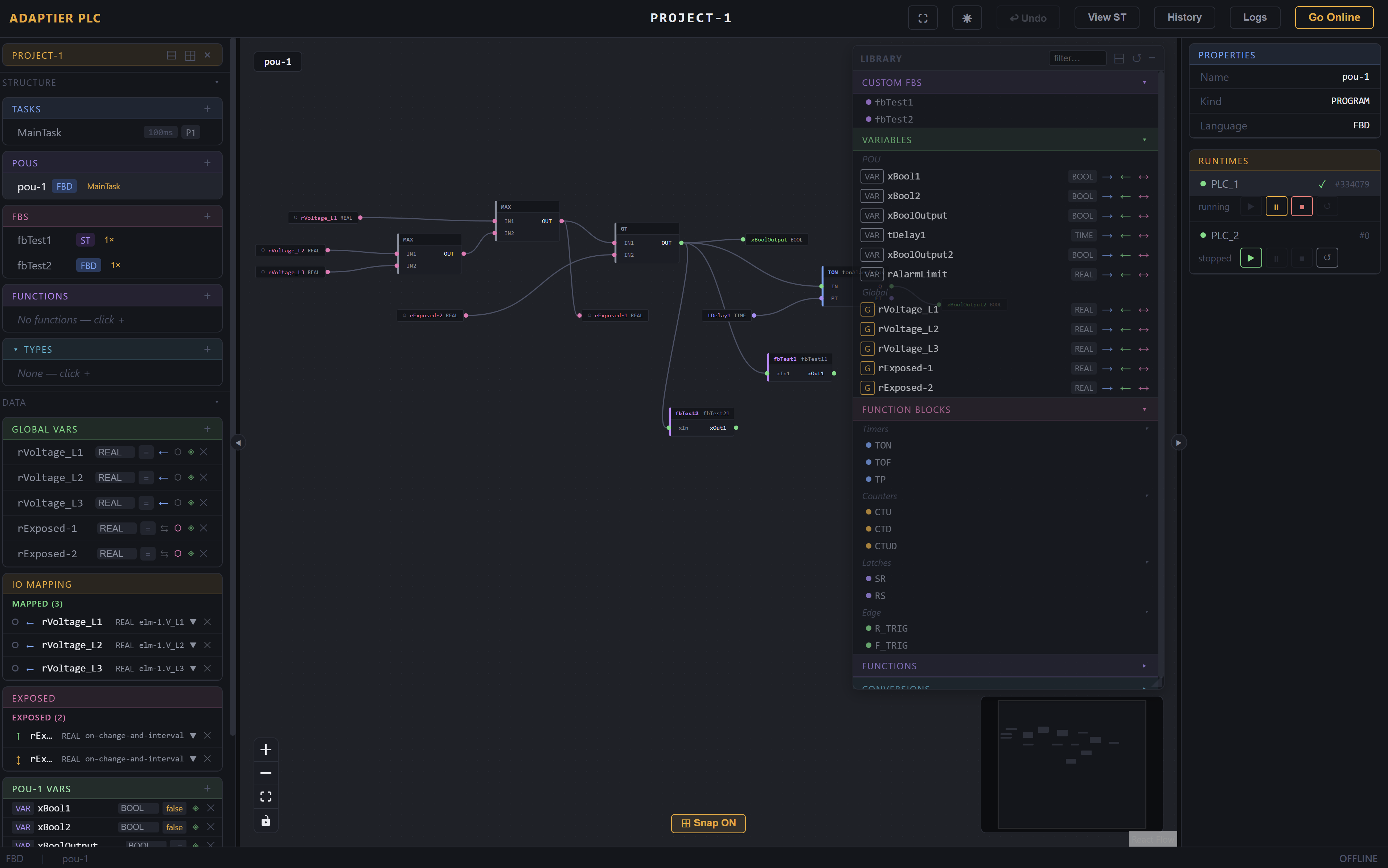
              <img src="images/screenshot-plc.png" alt="AdapTier PLC FBD editor" />
            </div>
            <div className="panel-card hero-shot-front">
              <div className="panel-chrome">
                <span className="dots"><i></i><i></i><i></i></span>
                <span className="title">configurator · pi-01</span>
                <span className="right">
                  <span className="pill">● CONNECTED</span>
                </span>
              </div>
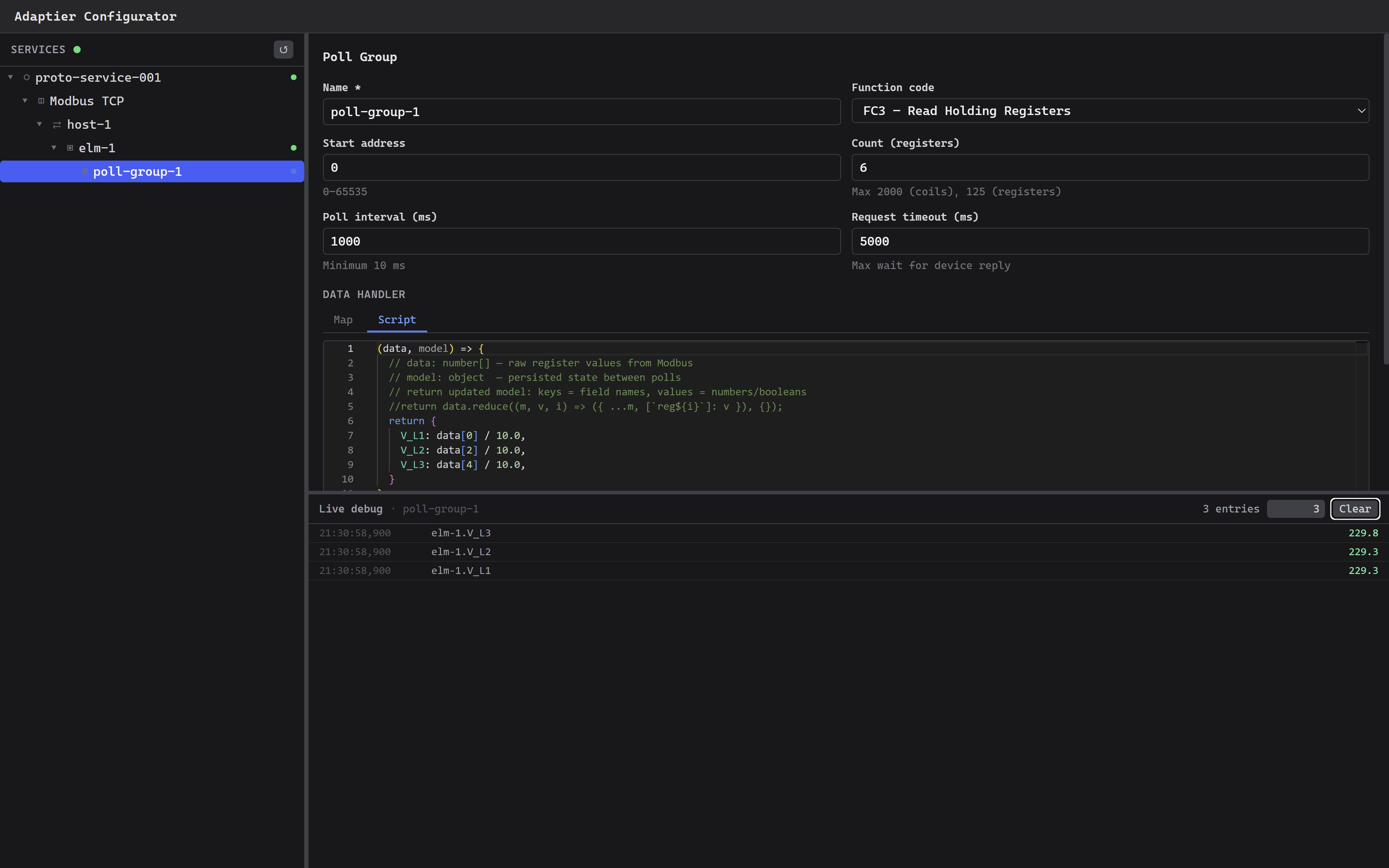
              <img src="images/screenshot-configurator.png" alt="AdapTier Configurator" />
            </div>
            {showStream && (
              <div className="hero-stream">
                <div className="panel-chrome">
                  <span className="title">live debug · elm-1</span>
                  <span className="right" style={{ color: '#4ec9b0' }}>● 2.8 Hz</span>
                </div>
                <div className="stream-rows">
                  <window.LiveStream rowCount={7} intervalMs={420} dense />
                </div>
              </div>
            )}
          </div>
        </div>
      </div>
    </section>
  );
}

const PROTOCOLS = [
  { name: 'Modbus TCP', status: 'green' },
  { name: 'M-bus TCP', status: 'green' },
  { name: 'OPC-UA', status: 'green' },
  { name: 'BACnet/IP', status: 'green' },
  { name: 'HTTP REST', status: 'green' },
  { name: 'NATS JetStream', status: 'green' },
  { name: 'MQTT', status: 'amber' },
  { name: 'SparkPlug B', status: 'amber' },
];

function ProtocolBelt() {
  const items = [...PROTOCOLS, ...PROTOCOLS]; // duplicate for seamless loop
  return (
    <section className="belt" data-screen-label="Protocols">
      <div className="container">
        <div className="belt-label">
          <span className="label">
            <span className="dot"></span>
            Supported protocols &amp; transports
          </span>
        </div>
      </div>
      <div className="marquee">
        <div className="marquee-track">
          {items.map((p, i) => (
            <div key={i} className="protocol-chip">
              <span className={`status-dot ${p.status === 'amber' ? 'amber' : ''}`}></span>
              {p.name}
            </div>
          ))}
        </div>
      </div>
    </section>
  );
}

function LiveDebugShowcase() {
  return (
    <section className="showcase" data-screen-label="Live Debug">
      <div className="container">
        <div className="showcase-grid">
          <div className="showcase-text">
            <span className="label">
              <span className="dot"></span>
              Live debug · WebSocket
            </span>
            <h2>See your data.<br/><span className="teal">Right now.</span></h2>
            <p>
              Every poll reading appears in the live debug panel as it arrives — path, value, unit, timestamp. Select a poll group in the tree and data streams in instantly.
            </p>
            <ul className="showcase-bullets">
              <li>
                <span className="num">01</span>
                <span className="desc"><strong>Sub-second telemetry.</strong> Values land in the panel within one poll cycle of the device replying.</span>
              </li>
              <li>
                <span className="num">02</span>
                <span className="desc"><strong>Type-aware rendering.</strong> BOOL, REAL, INT, STRING — each colored to match the wire color in the FBD canvas.</span>
              </li>
              <li>
                <span className="num">03</span>
                <span className="desc"><strong>Force values during debug.</strong> Override any data point at runtime to test downstream logic without touching the device.</span>
              </li>
              <li>
                <span className="num">04</span>
                <span className="desc"><strong>Filter by path.</strong> Scope the stream to a single device, register, or wildcard pattern.</span>
              </li>
            </ul>
          </div>

          <div className="debug-panel">
            <div className="panel-chrome">
              <span className="dots"><i></i><i></i><i></i></span>
              <span className="title">configurator · live debug</span>
              <span className="right">
                <span className="pill"><span className="status-dot teal"></span> 14 paths · 2.8 Hz</span>
              </span>
            </div>
            <div className="debug-tabs">
              <div className="debug-tab">Devices</div>
              <div className="debug-tab">Poll Groups</div>
              <div className="debug-tab active">Live Debug</div>
              <div className="debug-tab">Forces</div>
            </div>
            <div className="debug-body">
              <div className="debug-tree">
                <div className="tree-section">Poll Groups</div>
                <div className="tree-row expanded">elm-1 · electric</div>
                <div className="tree-row selected" style={{ paddingLeft: 40 }}>voltages</div>
                <div className="tree-row" style={{ paddingLeft: 40 }}>currents</div>
                <div className="tree-row" style={{ paddingLeft: 40 }}>power</div>
                <div className="tree-row">mb-2 · heat-meter</div>
                <div className="tree-row">bms · zones</div>
                <div className="tree-row">pump-7</div>
              </div>
              <div className="debug-stream">
                <window.LiveStream rowCount={11} intervalMs={320} />
              </div>
            </div>
          </div>
        </div>
      </div>
    </section>
  );
}

function PLCSpotlight() {
  return (
    <section className="plc" data-screen-label="PLC IDE">
      <div className="container">
        <div className="plc-head">
          <span className="label">
            <span className="dot"></span>
            PLC IDE · IEC 61131-3
          </span>
          <h2>A PLC IDE that lives in <span className="pink">the browser.</span></h2>
          <p>
            Full IEC 61131-3 programming — Function Block Diagram, Ladder, SFC, and Structured Text — with live online debugging, force variables, version snapshots, and NATS I/O mapping. No installation. Deploy over NATS.
          </p>
        </div>

        <div className="plc-shot-wrap">
          <div className="plc-shot">
            <div className="panel-chrome">
              <span className="dots"><i></i><i></i><i></i></span>
              <span className="title">adaptier-plc · main.fbd · pi-01</span>
              <span className="right">
                <span className="pill amber">● ONLINE</span>
                <span className="pill muted">cycle 12ms</span>
              </span>
            </div>
            <div className="lang-tabs">
              <div className="lang-tab active">FBD</div>
              <div className="lang-tab">Ladder</div>
              <div className="lang-tab">SFC</div>
              <div className="lang-tab">Structured Text</div>
              <div className="lang-tab" style={{ marginLeft: 'auto', borderRight: 'none', color: 'var(--text-muted)' }}>● Force vars (3)</div>
            </div>
            <img src="images/screenshot-plc.png" alt="AdapTier PLC FBD editor" loading="lazy" />
          </div>

          <div className="callout callout-1">
            <span className="pin">1</span>
            <span className="label-text">Live value badges on every <span className="teal">wire</span></span>
          </div>
          <div className="callout callout-2">
            <span className="pin">2</span>
            <span className="label-text">Drag-and-drop <span className="accent">function block</span> palette</span>
          </div>
          <div className="callout callout-3">
            <span className="pin">3</span>
            <span className="label-text">Force variables during online debug</span>
          </div>
          <div className="callout callout-4">
            <span className="pin">4</span>
            <span className="label-text">NATS I/O mapping in <span className="pink">global vars</span></span>
          </div>
        </div>

        <div className="plc-features">
          <div className="plc-feature">
            <span className="pf-label">Languages</span>
            <span className="pf-value">FBD · LD · SFC · ST</span>
            <span className="pf-desc">All four IEC 61131-3 graphical and textual languages, mixable in one program.</span>
          </div>
          <div className="plc-feature">
            <span className="pf-label">Standard Function Blocks</span>
            <span className="pf-value">Expected stdlib FBs</span>
            <span className="pf-desc">All the ones you'd reach for, ready to drop in — TON, TOF, TP, CTU/CTD/CTUD, SR/RS, R_TRIG, F_TRIG. Or roll your own.</span>
          </div>
          <div className="plc-feature">
            <span className="pf-label">Standard Functions</span>
            <span className="pf-value">~<span className="accent">120</span> functions</span>
            <span className="pf-desc">Plus 70+ type conversions across REAL, INT, BOOL, STRING.</span>
          </div>
          <div className="plc-feature">
            <span className="pf-label">Scheduler</span>
            <span className="pf-value">GCD multi-task</span>
            <span className="pf-desc">Independent task periods scheduled deterministically by greatest common divisor.</span>
          </div>
          <div className="plc-feature">
            <span className="pf-label">Persistence</span>
            <span className="pf-value"><span className="pink">RETAIN</span> across power loss</span>
            <span className="pf-desc">Mark variables RETAIN; the runtime persists state and restores on next boot.</span>
          </div>
          <div className="plc-feature">
            <span className="pf-label">Versioning</span>
            <span className="pf-value">History · diffs</span>
            <span className="pf-desc">Every save is a snapshot. Color-coded diffs show exactly what changed, when.</span>
          </div>
        </div>
      </div>
    </section>
  );
}

function FinalCTA() {
  return (
    <section className="final-cta" data-screen-label="Final CTA">
      <div className="container">
        <span className="label" style={{ marginBottom: 24, justifyContent: 'center' }}>
          <span className="dot"></span>
          Free trial · No credit card
        </span>
        <h2>Your field devices deserve better than custom scripts.</h2>
        <p>A production-ready platform that grows with your deployment — from one Pi in a basement to a fleet of edge nodes across a portfolio.</p>
        <div className="cta-row">
          <a href="#" className="btn btn-primary">Get Started Free</a>
          <a href="#" className="btn btn-ghost">Book a Demo</a>
        </div>
      </div>
    </section>
  );
}

function Footer() {
  return (
    <footer>
      <div className="container">
        <div className="foot-logo">
          <Logo size={13} />
          <span className="foot-tag">· Industrial automation platform</span>
        </div>
        <div className="foot-links">
          <a href="#">Docs</a>
          <a href="#">GitHub</a>
          <a href="#">Protocols</a>
          <a href="#">Pricing</a>
          <a href="#">Contact</a>
        </div>
        <div className="foot-copy">© 2026 ADAPTIER</div>
      </div>
    </footer>
  );
}

function App() {
  const [tweaks, setTweak] = useTweaks(DEFAULT_TWEAKS);

  // Apply accent color live
  React.useEffect(() => {
    document.documentElement.style.setProperty('--accent', tweaks.accent);
  }, [tweaks.accent]);

  // Density toggle
  React.useEffect(() => {
    if (tweaks.density === 'compact') {
      document.body.style.fontSize = '14px';
    } else {
      document.body.style.fontSize = '15px';
    }
  }, [tweaks.density]);

  return (
    <>
      <Nav />
      <Hero headlineStyle={tweaks.headlineStyle} showStream={tweaks.showStream} />
      <ProtocolBelt />
      <LiveDebugShowcase />
      <PLCSpotlight />
      <window.HMISection />
      <FinalCTA />
      <Footer />

      <TweaksPanel title="Tweaks">
        <TweakSection label="Accent" />
        <TweakColor label="Primary accent" value={tweaks.accent} onChange={v => setTweak('accent', v)} />
        <TweakSection label="Headline" />
        <TweakRadio
          label="Type"
          value={tweaks.headlineStyle}
          options={HEADLINE_OPTIONS}
          onChange={v => setTweak('headlineStyle', v)}
        />
        <TweakSection label="Hero" />
        <TweakToggle label="Live debug overlay" value={tweaks.showStream} onChange={v => setTweak('showStream', v)} />
        <TweakSection label="Density" />
        <TweakRadio
          label="Body"
          value={tweaks.density}
          options={DENSITY_OPTIONS}
          onChange={v => setTweak('density', v)}
        />
      </TweaksPanel>
    </>
  );
}

ReactDOM.createRoot(document.getElementById('root')).render(<App />);